Cluster: BOSE
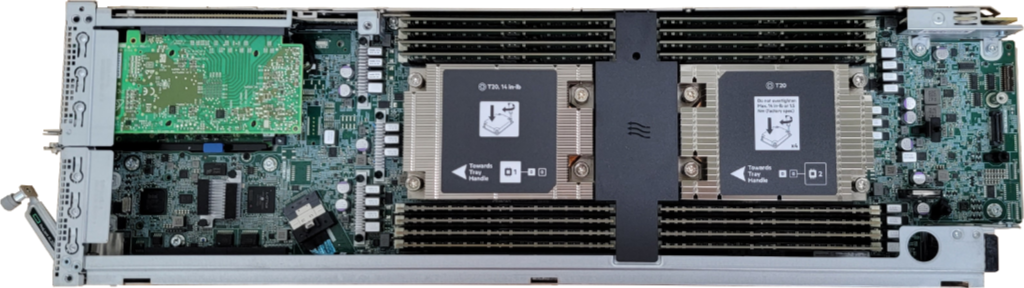
Brought online in 2021, BOSE is the newest and our flagship cluster at the Blugold Center for High-Performance Computing. Named after the Indian mathematician and physicist Satyendra Nath Bose, this cluster has successfully tripled our available resources and brought in all kinds of new research projects and opportunities that wasn't previously possible.
This cluster was funded by an NSF MRI grant (#1920220), along with an in-kind grant of hardware from Hewlett Packard Enterprise.
Are you looking to transition from BGSC to BOSE?
How To Connect
Supported Campuses
We currently support HPC accounts from the following UW campuses:
- UW-Eau Claire - VPN Guide
- UW-La Crosse - VPN Guide
- UW-Oshkosh - VPN Access Pending
- UW-River Falls - VPN Guide (1)
- UW-Stout Polytechnic - VPN Guide - Read note (2)
If you are trying to use the cluster away from your home campus, you'll need to first connect to your campus' VPN server.
If you do not see your campus listed and are interested in using our cluster, we'd be glad to have a conversation!
- UW-River Falls does not currently allow the UWRF VPN to be installed on non-university owned devices. If you plan to connect to the cluster off campus, please talk to the HPC Team for guidance.
- UW-Stout currently requires connecting to the Stout VPN at all times, even if you are on campus.
SSH / SFTP / SCP - Command Line
UW-Eau Claire Only
SSH access to the BOSE cluster currently requires a UW-Eau Claire account. If you are from another supported campus and need access to connect via SSH, please contact us to discuss options.
| Hostname | bose.hpc.uwec.edu |
| Port | 50022 |
| Username | Your UW-Eau Claire username - all lowercase |
| Password | Your UW-Eau Claire password |
| Password w/ Okta Hardware Token | UWEC Password,TokenNumber |
Using a hardware token or code with Okta?
By default, when you connect to our BOSE cluster over SSH, a push notification will be sent to the Okta Verify app on your phone for you to approve.
If you are unable to use your phone and are using a hardware token or six-digit code, you'll have to put the number you receive on the device directly after your password separated with a comma before you can log in.
Example:
Username: myuser
Password: mypass,123456
OnDemand Portal - Web Browser
Connecting to our computing cluster can be done right in your web browser, as long as you are connected to supported campus network.
Website: https://ondemand.hpc.uwec.edu
JupyterHub - Web Browser
We host a dedicated version of JupyterHub on our cluster that is available for all HPC users right in your web browser. Note that Open OnDemand has its own version of Jupyter, which has different features.
Website: https://jupyter.hpc.uwec.edu
Hardware Specs
Overall Specs
| Hardware Overview | # Total |
|---|---|
| # of Nodes | 65 |
| CPU Cores | 4,160 |
| GPU Cores | 61,440 |
| Memory | 18.6 TB |
| Network Scratch | 64 TB |
Node Specs
| Node Name | CPU Model | CPU Cores (Total) | CPU Clock (Base) | Memory (Slurm) | Local Scratch |
|---|---|---|---|---|---|
| cn[01-56] dev01 |
AMD EPYC 7452 (x2) | 64 | 2.35 GHz | 245 GB | 800 GB |
| gpu[01-03] | AMD EPYC 7452 (x2) | 64 | 2.35 GHz | 245 GB | 400 GB |
| gpu04 | AMD EPYC 7452 (x2) | 64 | 2.35 GHz | 1 TB | 400 GB |
| lm01 | AMD EPYC 7452 (x2) | 64 | 2.35 GHz | 1 TB | 400 GB |
| lm[02,03] | AMD EPYC 7452 (x2) | 64 | 2.35 GHz | 1 TB | 800 GB |
| h1gpu* | AMD EPYC 9354 (x2) | 64 | 3.25 GHz | 384 GB | 800 GB |
*Limited Access
Graphic Cards
| Node Name | GPU Cards | VRAM | Notes |
|---|---|---|---|
| gpu[01-04] | NVIDIA Tesla V100s x 3 | 32 GB x 3 | Available To All |
| h1gpu01 | NVIDIA H100 x 2 | 94 GB, 4 x 22 GB | Uses MIG, Restricted Use |
Slurm Partitions
| Name | # of Nodes | Max Time Limit | Purpose |
|---|---|---|---|
| week | 55 | 7 days | General use partiton. It should be used when your job will take less than a week, or if you can restart your job to continue running it from a checkpoint. This partition has the most nodes and is highly recommended for most jobs. |
| month | 24 | 30 days | Special partiton for longer-length jobs, but nodes are shared with the week partition. |
| GPU | 4 | 7 days | Partition that uses exclusively nodes that contain GPUs, only to be used when GPUs are required for your job. Note: You must specify –gpus=# to indicate how many GPUs you want to use. |
| h1gpu | 1 | 2 days | Limited-access partition for use of the H100 GPU server. |
| highmemory | 3 | 7 days | Partition for jobs that require large amounts of memory to compute. Our two nodes support up to 990GB of memory. |
| develop | 1 | 7 days | Development partition for software that needs additional libraries to be compiled. |
| pre | All | 30 days | Low-priority partition available on all nodes, but jobs may be requeued if resources are needed by a job on another partition. |
Acknowledgement
We request that you support our group by crediting us with the following message in your papers whenever using the BOSE supercomputing cluster for your research.
The computational resources of the study were provided by the Blugold Center for High-Performance Computing under NSF grant CNS-1920220.